


Video to MP3 Convert
4.1864.00 Reviews
App Specs
- Version
- v1.1.24
- Updated On
- License
- Free
- Downloads
- 1,000,000+
- Developer
- BDH Apps
- Categories
- Video Players & Editors
- Platform
- Android, iOS
Screenshots
 Analysis by AppCompare
I often need to pull a useful sound out of a video without turning the job into a full editing project. That might mean keeping a spoken explanation for a commute, isolating a short musical passage for personal listening, or making an audio copy of footage I already have permission to use. Video to MP3 Convert is built for that narrow, practical task: turning video into an audio file. I like that focus, although it also means the app is best judged as a quick utility rather than a complete studio for shaping and publishing sound.
A focused starting point for audio work
This is a free video-player and editing app from BDH Apps, and its purpose is easy to understand before you open it: choose a video, extract its sound, and work with the result. That direct workflow suits people who do not need a timeline full of editing controls. If you already have a video file on your device, the conversion can be a useful first step toward listening, trimming, or passing the audio along to another app.
The app has a 4.2 average from around 52,000 ratings, with more than a million installs. Those figures suggest it has found an audience, but they are not a substitute for checking whether its particular workflow fits yours. It is rated for Everyone, and the app itself is free to install, with optional in-app purchases listed from $1.49 to $99.99 per item. The practical question is less about its broad popularity and more about whether you regularly need to extract audio from files you can access.
Choose source material with care
A helpful habit is to decide what you want from a clip before converting it. For a long interview, for example, you may want the complete speech so you can listen while doing something else. For a brief musical moment or a spoken line, trimming after conversion can keep the result focused and reduce the effort needed to find the useful section again. That small bit of planning makes this kind of tool feel less like a file converter and more like the beginning of a simple audio workflow.
It is also worth separating file conversion from permission to use the material. I would use it with my own recordings or content I am allowed to copy, rather than assuming that being able to extract audio makes a video’s soundtrack free to download, redistribute, or add to a public project. If the goal is to publish, check the rights and the rules of the source platform first.
The current version is v1.1.24, and it supports devices running Android 7.0 or later. That makes the minimum operating-system requirement an easy thing to check before installing, especially if you keep an older phone for everyday tasks. I would also consider where you plan to keep the finished files: an extracted track is most useful when you can find it again, not just when the conversion completes.
The Magic of Video to MP3 Conversion
Picture this: You're watching a live concert on YouTube, and the music is simply out of this world. You want that audio in your playlist, but the video platform doesn't allow for easy downloads. Enter Video to MP3 Convert. This app is like a magician's wand, effortlessly extracting audio tracks from videos, so you can savor the sound without the visual distractions.
Worth Reading Before You Choose

EA SPORTS FC Mobile 26 Is a Bigger Football Game, but It Takes Time

Flipboard Shows What News Apps Must Do Beyond the Feed

Switching to Android Auto Means Rethinking Your Driving Routine

Google Calendar Makes a Crowded Week Easier to Manage

Ludo King Makes the Most of the Minutes Between Plans

Baby Panda World Brings Quick Play to Modern Phones, but Its Game Library Feels Busy
Getting Started: First Impressions
First things first, downloading and installing the app is a breeze. Available for both Android and iOS, it’s a quick find on the app store. Once installed, the interface welcomes you with a simple, user-friendly layout. No clutter, no unnecessary buttons—just a straightforward path to converting your videos to MP3.
The app supports a variety of video formats, which is fantastic because you can convert almost anything you come across. I tested it with MP4, AVI, and even some MKV files, and it worked like a charm each time.
The Conversion Process: Easy as Pie
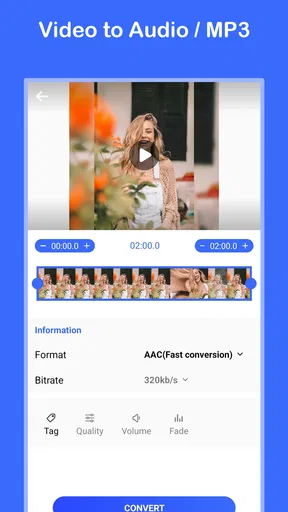
Converting a video is as easy as pie. You just tap on the “Add Video” button, select the file you want to convert, and hit “Convert.” Voila! In just a few moments, your audio file is ready to be played or shared. The app also allows you to choose the audio quality, which is a neat feature if you're conscious about storage space or audio fidelity.
I was particularly impressed by the speed of conversion. Even longer videos didn’t take much time, which is perfect for those of us who are always on the go.
Making a more useful audio copy
A realistic example is a class, meeting, or personal voice recording saved as a video. I would convert it before a train ride, then listen without keeping the screen on the footage. For spoken material, the main benefit is convenience rather than a change in sound: the words remain the point, so a compact, manageable audio file is often more useful than a video that must stay open.
For music, I would be more selective. An audio file can be easier to replay, but conversion cannot restore detail that was not present in the video’s soundtrack. If the source is noisy, compressed, or recorded from a distance, choosing a higher output quality cannot magically clean it up. I treat the quality setting as a choice about the output and storage trade-off, not as a repair tool.
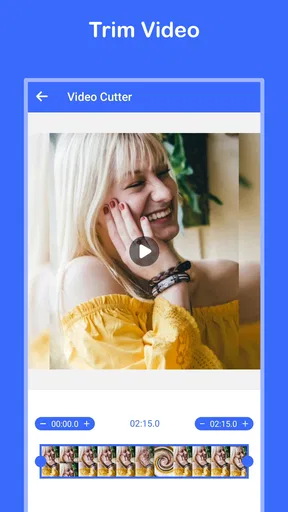
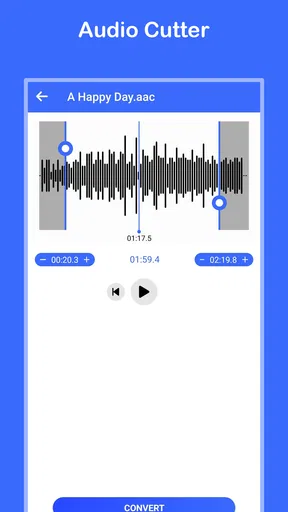
When I want only a short passage, I would first make sure the conversion is complete and then use the trim option to select the start and end by listening, rather than estimating from memory. That avoids keeping a long lead-in or cutting off the first word or note. For a ringtone or a personal reference clip, leaving a little breathing room at either end can also make the cut sound less abrupt.
Additional Features Worth Mentioning
Aside from the main conversion feature, the app offers some additional goodies. You can trim your audio right within the app, allowing you to cut out any unwanted parts. This is perfect for creating ringtones or just grabbing a specific segment of a song.
Moreover, Video to MP3 Convert includes a built-in audio player, so you can listen to your converted files without needing another app. It’s like having a mini-music library right at your fingertips.
Where it fits among the alternatives
Compared with a desktop audio editor, this is a lighter choice for a one-off extraction: you do not need to build a multitrack project just to get sound from a video. Compared with a general-purpose media player, it is more directly aimed at producing an audio file you can use elsewhere. But if you need detailed noise reduction, precise waveform editing, fades, multiple tracks, or a finished mix for publication, a dedicated audio editor is the better tool. I would not mistake trimming a clip for mastering it.
There is another practical distinction from streaming or music-library apps. Those services are designed to help you find and play licensed music; this app is for working with video files you can select. If what you want is convenient access to an artist’s catalog, a music service is simpler and more appropriate. If you already have a permitted video source and want its sound as a separate file, conversion makes more sense.
One useful workflow is to convert only the material you actually plan to keep, listen through it in the built-in player, and trim the section you need before sharing or organizing it. That reduces clutter from unnecessary full-length copies. For a batch of unrelated clips, I would handle them one at a time and check each result before moving on; a quick listen catches a wrong source or an unhelpful cut before it gets mixed into a collection.
Small trade-offs that matter in daily use
The simplicity is a strength, but it comes with a boundary: this is not a full project manager for audio. Someone preparing a podcast episode, adding narration over music, or polishing a track for a public release will likely need other tools after extraction. Even a clean conversion can leave you with an awkward beginning or ending, and trimming does not replace careful editing when timing and sound balance matter.
Storage is another consideration. Keeping both the original video and a converted audio copy takes more room than keeping one, so I would remove temporary files once I am sure the audio is the version I need. On the other hand, retaining the original can be sensible if I may need to redo the trim later. The right choice depends on whether convenience or conserving space matters more on your device.
For a short clip, conversion speed may barely affect the decision. With longer recordings, the app’s quick process is welcome, but I would still check the whole result if missing a section would matter. A preview of the beginning alone cannot tell you whether a long file has the right ending, so a brief final listen is a good handoff check before relying on it offline or sending it to someone else.
My Personal Take
As someone who loves music and often finds great audio tracks in videos, this app is a game-changer. It's incredibly intuitive, and the conversion quality is top-notch. I’ve used it to create playlists from live performances and movie scores, and it’s never let me down.
Another thing I appreciate is that the app doesn’t bombard me with ads, which is a huge relief in today's ad-heavy app environment. It’s nice to have a tool that focuses on functionality without distracting you.
I would recommend it most to someone who occasionally needs a direct route from a video file to a playable audio track, especially when trimming a selected passage is enough. It is less suitable for creators who need detailed editing controls or anyone expecting it to source music, clean up poor recordings, or handle a complete publishing workflow. That distinction keeps expectations realistic and helps the app do the small job it is meant for.
Wrapping Up: Is It Worth It?
If you’re like me and crave the convenience of having your favorite video audios in a portable format, then yes, Video to MP3 Convert is worth every minute you spend on it. It’s reliable, efficient, and does exactly what it promises.
So, next time you catch a tune from a video that you just can't get out of your head, give this app a spin. Trust me, your playlists will thank you for it. Happy converting!
Pros
- Fast conversion with high-quality output.
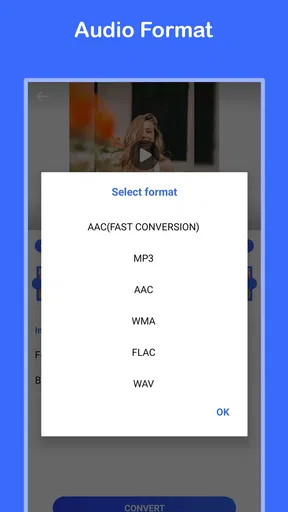
- Supports multiple audio formats.
- User-friendly interface for easy navigation.
- Batch conversion saves time.
- No intrusive ads during use.
Cons
- Limited editing features for audio files.
- Requires internet for certain features.
- No cloud storage integration.
- Free version has limited conversions.
- Occasional minor bugs in updates.
FAQs for Video to MP3 Convert
What is Video to MP3 Convert used for?
Video to MP3 Convert is an app designed to extract audio from video files. It allows users to convert videos into MP3 format, making it easy to create audio files from video content. This is particularly useful for creating music playlists from video clips or extracting audio from lectures and tutorials.
Is Video to MP3 Convert free to use?
Yes, Video to MP3 Convert offers a free version with basic features. However, it may include ads or limitations on file size and conversion speed. A premium version might be available for users who want an ad-free experience and access to additional features like batch processing or higher quality output.
What video formats does Video to MP3 Convert support?
Video to MP3 Convert supports a wide range of video formats, including MP4, AVI, MOV, and MKV. This flexibility ensures that users can convert audio from most of their video files without compatibility issues. It is always recommended to check the app’s specifications for a complete list of supported formats.
Is the audio quality preserved during conversion?
Video to MP3 Convert aims to maintain high audio quality during the conversion process. Users can often select the desired bitrate to balance quality and file size. While the app strives to preserve quality, the final output may also depend on the original video’s audio quality and the chosen settings.
Can I edit audio files within the app?
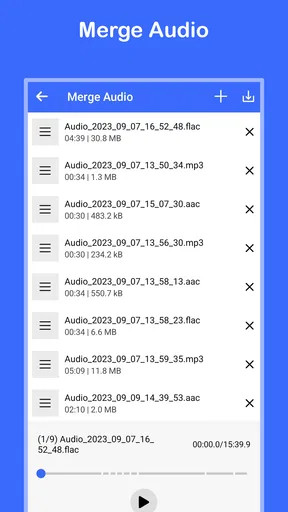
Some versions of Video to MP3 Convert offer basic audio editing features, such as trimming and merging audio files. This allows users to customize their MP3 files directly within the app. However, for more advanced editing, users might need to use dedicated audio editing software.


